






By Frank Ulom
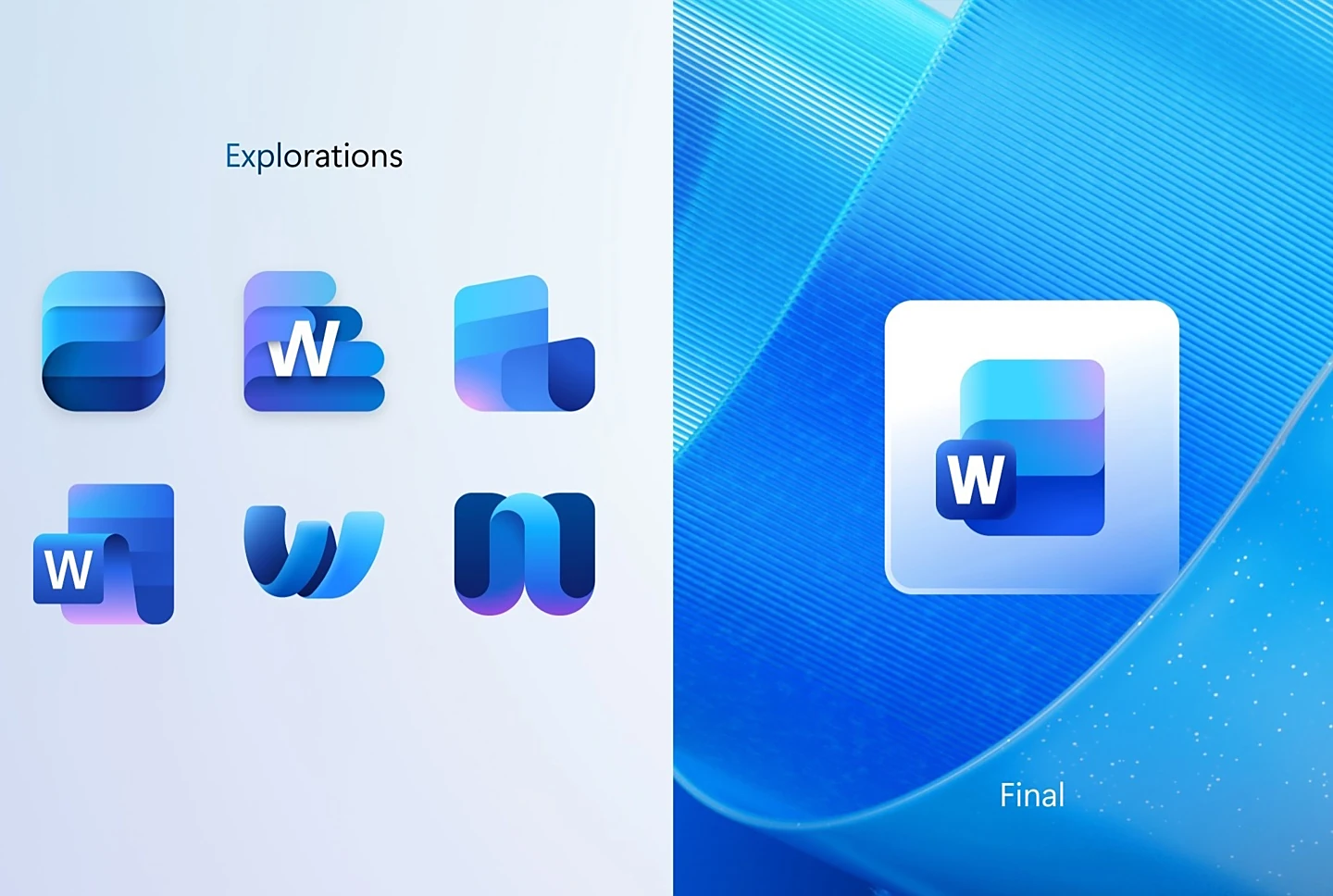
CALIFORNIA (CONVERSEER) – Microsoft has rolled out a redesigned set of Office icons, introducing a modern and fluid visual style for its core productivity suite. Alongside the launch, the company released a series of early concept designs that reveal how Word, Excel, and PowerPoint icons evolved during the creative process.
According to The Verge on 15 October, several of the pre-final concepts were markedly different from the icons Microsoft ultimately chose, drawing inspiration from the visual style of earlier Mac versions of Office.
Word Icons: From Notebooks to Minimalism
The design team explored various approaches for the Word icon, including notebook-style motifs and document stacks to symbolise writing and editing. Designers experimented with using the “W” letter as the main graphic element, embedding it within the icon, or removing it entirely. In the end, Microsoft selected a minimalist design featuring three horizontal bars, released in versions with and without the “W.”
Excel Icons: Reinforcing the Grid
Excel’s icon concepts continued to emphasise its core identity—the spreadsheet grid. Early designs focused on cell patterns and structures, reinforcing Excel’s association with data organisation. The final version maintained the familiar grid motif while adopting a smoother, more vibrant gradient style.
READ ALSO: Samsung to build camera factory for iPhone 18, challenging Sony’s supply lead
PowerPoint Icons: Balancing Tradition and Creativity
For PowerPoint, Microsoft explored more radical redesigns. Some concept icons reimagined the letter “P” as a ribbon or overlaid it with a pie chart, giving it a dynamic look. Ultimately, the company opted for a conservative update that slightly rounded the existing design and enhanced it with richer colours.
Broader Rollout Across Platforms
The new icons extend beyond the three flagship apps to include Teams, OneDrive, Outlook, and OneNote. They are being gradually deployed across Windows and iOS. Notably, Windows users will see versions of the icons that retain the application letters, while iOS will feature cleaner, non-lettered versions.
A New Visual Language
Jon Friedman, Corporate Vice President of Microsoft 365 Design and Research, explained that this is the first major update to Office icons since 2018. “The language we used then is almost the same as it is today: connection, consistency, seamless collaboration, and smooth transitions,” Friedman said. “The new icons exude a sense of fluidity and fun, while being simpler, more intuitive, and highly accessible.”
Like Google’s recent visual updates, Microsoft has embraced a more pronounced gradient colour scheme. “The gradient used to be more subtle, but now it’s stronger and more vivid. The exaggerated analog transition enhances recognition,” Friedman added.
The refreshed icons signal Microsoft’s continued push to modernise its visual identity while preserving the familiarity that millions of users rely on daily.
See photos below…