By Joe Udo
CALIFORNIA (CONVERSEER) – Microsoft today pushed out the latest Windows 11 preview build 26220.7653 to Insider users on the Dev channel.
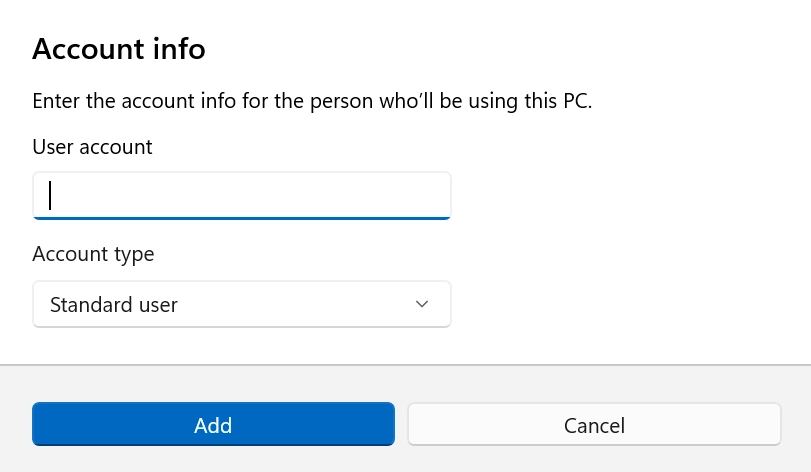
This version is for the Windows 11 25H2 branch and is largely consistent with the Beta version released last week. The main changes include a modern overhaul of the UI for account settings dialogue boxes and fixes for several known issues in the system.
In terms of functionality and experience improvements, Microsoft has redesigned the relevant dialogue boxes in “Settings > Accounts > Other users” based on the modern WinUI framework and added support for dark mode.
Whether the options in this dialogue box are visible depends on whether a domain-joined work or school account is configured on the device.
In addition, the loading speed of Copilot’s suggestions in the “Click to Do” feature has been improved to instantaneous display (excluding the European EEA or China regions). Regarding personalisation settings, users can now set .webp format images as desktop wallpapers in “Settings > Personalisation> Desktop Background”.
In addition to these, this Windows 11 update also focuses on fixing a large number of bugs. Regarding the taskbar and system tray, Microsoft has fixed an issue where the auto-hide taskbar would unexpectedly pop up before the bottom of the screen was touched, as well as an issue where the Start Menu, Notification Centre, and Quick Settings would be unresponsive in some cases.
Regarding the Start Menu, Microsoft has fixed performance degradation caused by a memory leak, an abnormal Start Menu display position for Arabic and Hebrew users, and an issue where pinning app folders during touch operations would cause the Start Menu to close. Bluetooth-related fixes have resolved an issue where battery information was not displayed on some devices.
Regarding the Xbox PC Fullscreen Experience (FSE), this version fixes some abnormal behaviours in apps and games, but related known issues are still under investigation.
The login and lock screen interfaces have fixed the issue of the password icon being displayed as blank; the settings app has fixed the potential crash when interacting with audio devices, as well as the issue where the keyboard character repeat delay setting was reversed with the background logic.
Other fixes include issues such as msinfo32 text being cropped under high DPI scaling, .appinstaller files failing to install MSIX packages, Notepad not displaying underlines under certain fonts and 125% scaling, and explorer.exe freezing on first login under certain startup configurations and the taskbar not displaying.
At the same time, Microsoft also listed the known issues that still exist. These include some apps behaving abnormally in Xbox full-screen mode, app icons not displaying in the system tray, and a small number of users experiencing a black screen on their secondary monitor after the update.
See photos below: