By Our Reporter
NEW YORK (CONVERSEER) – Apple released iOS 26.3 and iPadOS 26.3 updates today (February 12). The updates are minor, introducing a few new features and focusing more on refining the user experience. Below are updated contents for the official iOS 26.3 version:
I. End-to-end encrypted RCS message support
In the iOS 26.3 update, Apple upgraded the Messages app, adding support for end-to-end encrypted RCS messages and expanding privacy protection when sending text messages with Android users.
A new “SupportsE2EE” key has appeared in carrier bundles from several wireless carriers, indicating that Apple is preparing to support encrypted RCS messages at the system level. While the feature is now integrated into iOS 26.3, its availability depends on whether each carrier has enabled the encrypted RCS standard on its network.
Several French operators have initially supported end-to-end encrypted RCS messages in their operator bundles, but rollout may vary by region, and users may not be able to enable end-to-end encrypted RCS messages even if they have iOS 26.3 installed.
II. Easier to transfer from iPhone to Android phone
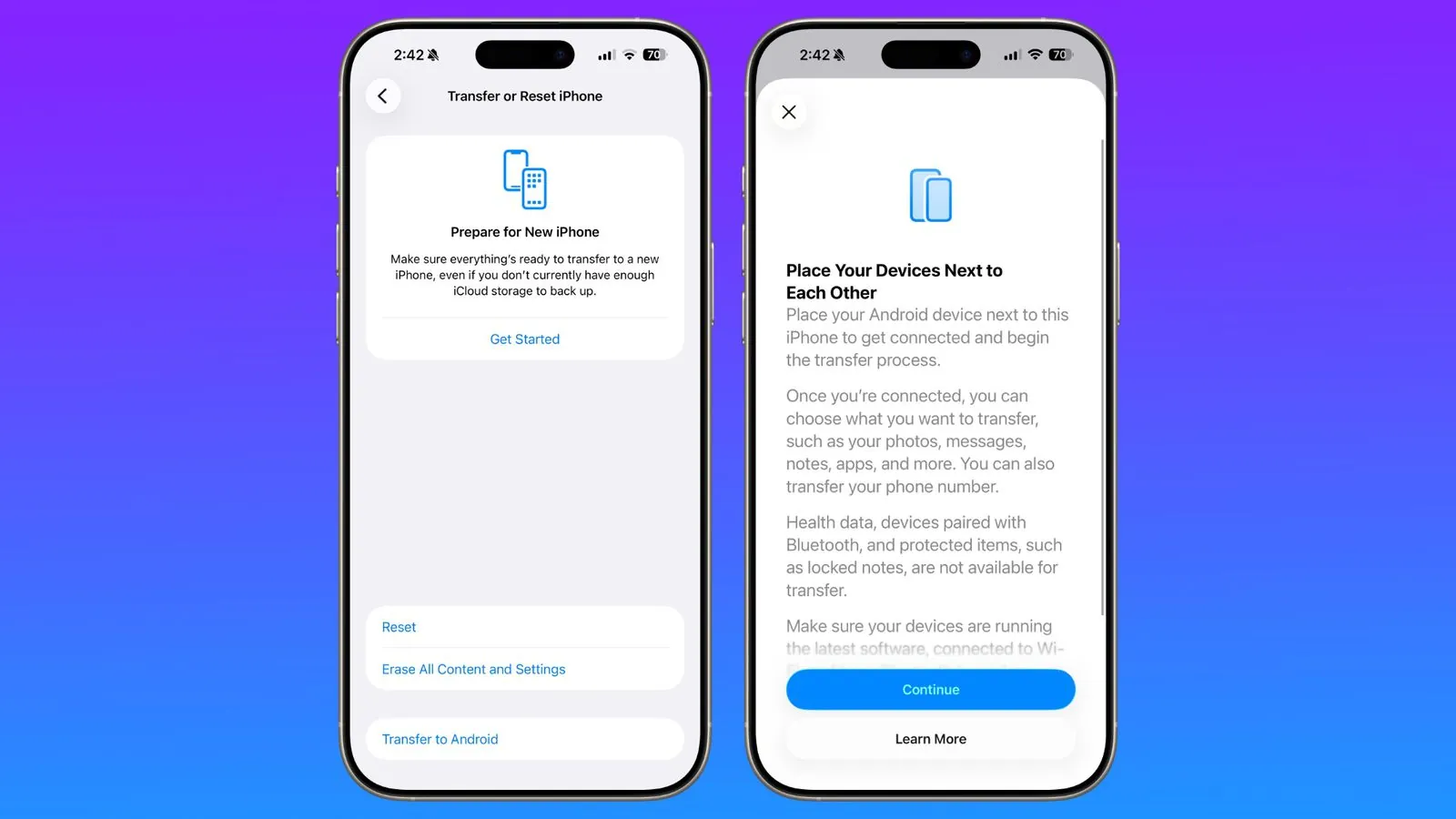
Apple has partnered with Google to simplify the cross-platform device switching process by introducing a native “iPhone to Android” data migration tool in the iOS 26.3 beta.
This feature eliminates the need for users to download third-party apps or use complicated cable connections. It allows users to wirelessly transfer core data such as photos, text messages, memos, passwords, and applications to Android devices simply by connecting via Wi-Fi and Bluetooth.
This feature is implemented based on a simplified wireless pairing mechanism. Users simply need to bring their iPhone close to the target Android device, ensuring both are connected to Wi-Fi and have Bluetooth enabled, to start the migration process.
The system offers two pairing methods: one is to scan the QR code displayed on the Android device with your iPhone; the other is to enter a specific session ID and pairing code. This design mimics the seamless experience within the Apple ecosystem (such as switching from an old iPhone to a new iPhone), thereby improving the ease of cross-platform data transfer.
Regarding data compatibility, the new tool supports the migration of frequently used data such as photos, text messages, regular memos, application lists, saved passwords, and phone numbers. However, to protect user privacy and security, some sensitive data, such as Health Data, Bluetooth device pairing records, and password-protected “locked memos,” are excluded from the migration list and will not be transferred to the new device.
III. Notification forwarded to third-party devices
Apple introduced a new “Notification Forwarding” option in iOS 26.3, breaking down long-standing ecosystem barriers and allowing iPhone users to seamlessly transfer notifications previously confined to the Apple ecosystem to third-party wearable devices other than the Apple Watch. Users can find and enable this new option by going to the “Notifications” section of the “Settings” app, allowing them to view phone messages in real time on other brands of smartwatches or fitness trackers.
To balance the system logic, Apple has set clear limitations for this feature. Apple’s official explanation states that a notification stream can only point to a single device at a time. This means that if a user has enabled notification forwarding to third-party devices, their paired Apple Watch will temporarily lose the ability to receive and display notifications.
However, Apple maintains openness in content presentation. Users can choose which app notifications to forward, and the forwarded content will include the app name and full notification details, ensuring the integrity of the information.
Behind this feature update lies the severe regulatory challenges Apple faces globally. The EU’s Digital Markets Act (DMA) explicitly requires tech giants to open up their core platform services, forcing Apple to provide third-party smartwatches with the same notification access as the Apple Watch.
Third-party devices have previously struggled to compete with the Apple Watch in terms of functionality and user experience due to their inability to obtain system-level notification permissions. This situation has become a focus of attention for regulatory agencies.
IV. Privacy Control
iOS 26.3 expands privacy options, adding a “Restrict Precise Location” option to limit the precision with which users share their location with cellular networks.
By enabling location restriction, users can limit the precision with which cellular networks determine their location. Carriers can only identify the general area where the device is located, but cannot obtain the specific street address or precise coordinates.
Apple specifically emphasises that this setting is only for carrier data collection and will not affect the user’s call signal quality, data transmission speed, or interfere with emergency rescue services (such as calling an ambulance), or obtain accurate location information.
In addition to location control, Apple has also made minor improvements to the privacy section of the Settings app, making it easier for users to understand and manage privacy-related options such as app permissions and data sharing.
V. New Wallpaper
The original “Weather & Astronomy” section has been split into two separate sections: “Weather” and “Astronomy,” and new wallpapers have been added to the “Weather” section.
This adjustment allows users to more intuitively perceive current climate changes through the lock screen or home screen background, while also enriching the system’s personalisation options.
VI. Close-range pairing of third-party devices
Another mandatory feature of the EU is support for proximity pairing of third-party devices, similar to how AirPods are currently paired with iPhones or iPads. This means that, at least in EU countries, third-party headphones and other competing devices will be on a more level playing field in terms of initial setup experience and ease of use.